
Download WorkbookPDF – Personalized Language Learning Workbooks, Free PDF, Secure Update
What Is WorkbookPDF and Who Is It For?
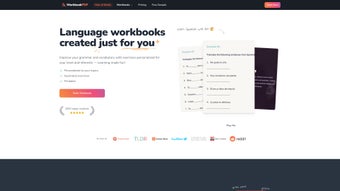
WorkbookPDF is a modern, AI‑driven language‑learning solution that instantly creates personalized PDF workbooks for learners of any proficiency level. After a quick placement test or a brief questionnaire about interests, the platform analyses the data and assembles a ten‑exercise workbook that blends grammar drills, targeted vocabulary, and cultural notes. Each workbook is fully illustrated, offering visual cues that help retain new words and concepts.
Whether you are a beginner who wants to master basic greetings in Spanish, an intermediate learner aiming to sharpen French verb conjugations, or an advanced student polishing Japanese kanji, WorkbookPDF adapts its content to match your exact needs. The exercises span a variety of formats—fill‑in‑the‑blank, multiple‑choice, true/false, translation, matching, and picture‑based tasks—ensuring that learners stay engaged and practice all language skills in a balanced way. The service supports more than 20 languages, from widely spoken tongues like English, Mandarin, and Arabic to emerging options such as Swahili and Hindi.
Pricing is flexible: users can buy a single workbook, opt for discounted bundles, or acquire a commercial‑rights license that lets educators resell the PDFs to their classes. A 7‑day money‑back guarantee reduces the risk for new users, while the secure, PCI‑compliant checkout process guarantees safe transactions. In short, WorkbookPDF offers a secure, affordable, and highly adaptable learning resource for self‑learners, students, teachers, and corporate trainers who value focused, printable practice that can be used online or offline.
Key Features That Set WorkbookPDF Apart
WorkbookPDF’s feature set is built around personalization, accessibility, and continuous improvement. The AI engine analyses learner input and creates a workbook that feels hand‑crafted, while the underlying technology ensures that each new edition reflects the latest curriculum standards. Below is a detailed look at the most important capabilities that make the product stand out in a crowded language‑learning market.
- AI‑Generated Personalization: Workbooks are automatically customized based on the learner’s level, interests, and the language selected, delivering content that is neither too easy nor too hard.
- Multi‑Format Exercises: Includes fill‑in‑the‑blank, multiple‑choice, true/false, translation, matching, and picture‑based tasks to train reading, writing, and critical thinking.
- Illustrated Design: Every workbook contains colourful, culturally relevant illustrations that make learning engaging and memorable, especially for visual learners.
- Offline Access: PDFs can be downloaded for study without an internet connection, perfect for commuters, travelers, or learners in low‑bandwidth regions.
- Broad Language Support: More than 20 languages, ranging from popular choices like English, Spanish, and French to less‑common options such as Korean, Swahili, and Hindi.
- Flexible Pricing Model: Single workbook ($9.99), bundle packs ($29.99 for five), and commercial‑rights licensing for educators provide cost‑effective options for all budgets.
- Secure Payment & Refund Policy: PCI‑compliant checkout and a 7‑day full‑refund guarantee protect buyers and encourage trial.
- Progress Tracking Dashboard: Optional account dashboard records completed workbooks, highlights weak areas, and suggests the next level of practice.
- Cross‑Platform Compatibility: PDFs work seamlessly on Windows, macOS, Android, and iOS devices via any standard PDF reader.
- Regular Content Updates: New exercise sets are added monthly, keeping the material fresh and aligned with contemporary language curricula.
Installation, Usage Instructions, and System Compatibility
Getting started with WorkbookPDF is intentionally simple because the product is delivered as a standard PDF file. After completing a purchase, you will receive an email containing a secure download link. Clicking the link initiates an immediate download—no additional software installation is required beyond a PDF viewer that is already present on most devices. For Windows users, the built‑in Microsoft Edge or Adobe Acrobat Reader opens the files without trouble. macOS users can rely on Preview or any third‑party PDF reader, while Android and iOS users simply tap the link to open the workbook in Google PDF Viewer, Apple Books, or any installed PDF app. Once downloaded, the workbook can be stored locally, transferred to an e‑reader, or printed for a traditional pen‑and‑paper experience.
Supported Operating Systems: Windows 10 or later, macOS 10.13+ (High Sierra and newer), Android 8.0+ (Oreo), iOS 13+ (iPhone & iPad). The PDFs are fully responsive, scaling gracefully on tablets, e‑readers, and low‑resolution screens.
To maximise the benefit of each workbook, follow this step‑by‑step workflow:
- Open the PDF in your preferred viewer and skim the introductory notes that explain the exercise format.
- Complete each of the ten illustrated tasks, using the answer key at the end of the document for self‑assessment.
- If you encounter challenging items, mark them with a highlighter or a digital note; the optional dashboard will record these spots.
- Log into your WorkbookPDF account (optional) to let the system analyse your performance and suggest a follow‑up workbook that targets identified gaps.
- Print the workbook if you prefer handwritten practice, or keep it digital for quick reference and on‑the‑go study sessions.
The design of the workflow supports both short, 15‑minute micro‑learning bursts and longer, focused study blocks of up to two hours, allowing you to adapt the tool to any schedule or learning style.
Pros & Cons, Frequently Asked Questions, and Final Thoughts
Pros
- Highly personalized content thanks to AI‑driven customization, which reduces the need for external assessment tools.
- Versatile exercise formats keep learners engaged and address multiple language skills in a single workbook.
- Offline PDF access works on any device with a standard reader, eliminating dependence on internet connectivity.
- Affordable pricing with bundle discounts makes the solution scalable for individual learners and institutions.
- Commercial‑rights option opens a revenue stream for educators and enables seamless integration into classroom curricula.
- Regular monthly updates ensure that material stays current with linguistic trends and pedagogical standards.
Cons
- No built‑in audio component; learners must source listening practice from external platforms.
- Limited to PDF format; there is currently no native mobile app that offers push notifications or interactive features.
- The initial placement test is brief, which may affect the precision of the first generated workbook for some users.
- Answer keys are provided at the end of each workbook, which could encourage checking answers before completing all exercises.
- Customization options are primarily based on level and interest; more granular control (e.g., focusing on specific grammar topics) is not yet available.
Frequently Asked Questions
Can I get a refund if I’m not satisfied?
Yes. WorkbookPDF offers a 7‑day money‑back guarantee. Simply contact support within the refund window and they’ll process a full refund to your original payment method.
Do the workbooks include audio for listening practice?
Currently the PDFs focus on reading and writing exercises. Audio files are planned for a future update, but for now you can supplement with free resources like YouTube, language‑learning podcasts, or built‑in text‑to‑speech features on your device.
Is there a discount for schools or bulk purchases?
Yes. Educators can purchase the Commercial Rights license, which provides a 30 % discount on bulk orders and the right to resell the PDFs to students.
What languages are currently supported?
WorkbookPDF supports over 20 languages, including English, Spanish, French, German, Italian, Portuguese, Korean, Japanese, Chinese (Simplified & Traditional), Arabic, Russian, Hindi, Swahili, and many more.
Do I need an account to download a workbook?
An account is optional for a one‑time purchase, but creating one enables progress tracking, personalized recommendations, and easier access to future updates and bundle offers.
Conclusion – Should You Download WorkbookPDF?
If you are looking for a secure, affordable, and truly personalized language‑learning resource, WorkbookPDF delivers on its promises. The AI‑driven customization guarantees that each workbook aligns with your current skill level and personal interests, while the universally compatible PDF format ensures that you can study on Windows, macOS, Android, or iOS without additional installations. Although the lack of built‑in audio may be a drawback for auditory learners, the extensive variety of exercise types and the visually rich design keep motivation high. Educators will especially value the commercial‑rights option, which transforms the workbooks into a viable classroom supplement or even a revenue source. With a solid 4.6‑star rating from over 800 satisfied users and a hassle‑free 7‑day refund policy, the risk is minimal and the potential payoff in language proficiency is significant.
Ready to boost your grammar and vocabulary? Download WorkbookPDF today and start your personalized language journey now.



.png)



